Hey there,
I'm Wilbur
// MX1D
- Software Developer
Whether it's bot, web, modding, etc. You've come to the right person. With over 4 years of development experience, and 100+ happy reviews, you'll receive the fastest high-quality product of your life.
With experience in:
 Discord Bot Development
 Telegram Bot Development
 Plugin Development
 Mod Development
 NextJS
 React
 Web Scraping
 Automation Scripts
4+
Years of experience
Delivering high-quality software solutions and robust automation across diverse platforms.
400+
Successful Projects
100+
Satisfied Customers
FEATURED PROJECTS
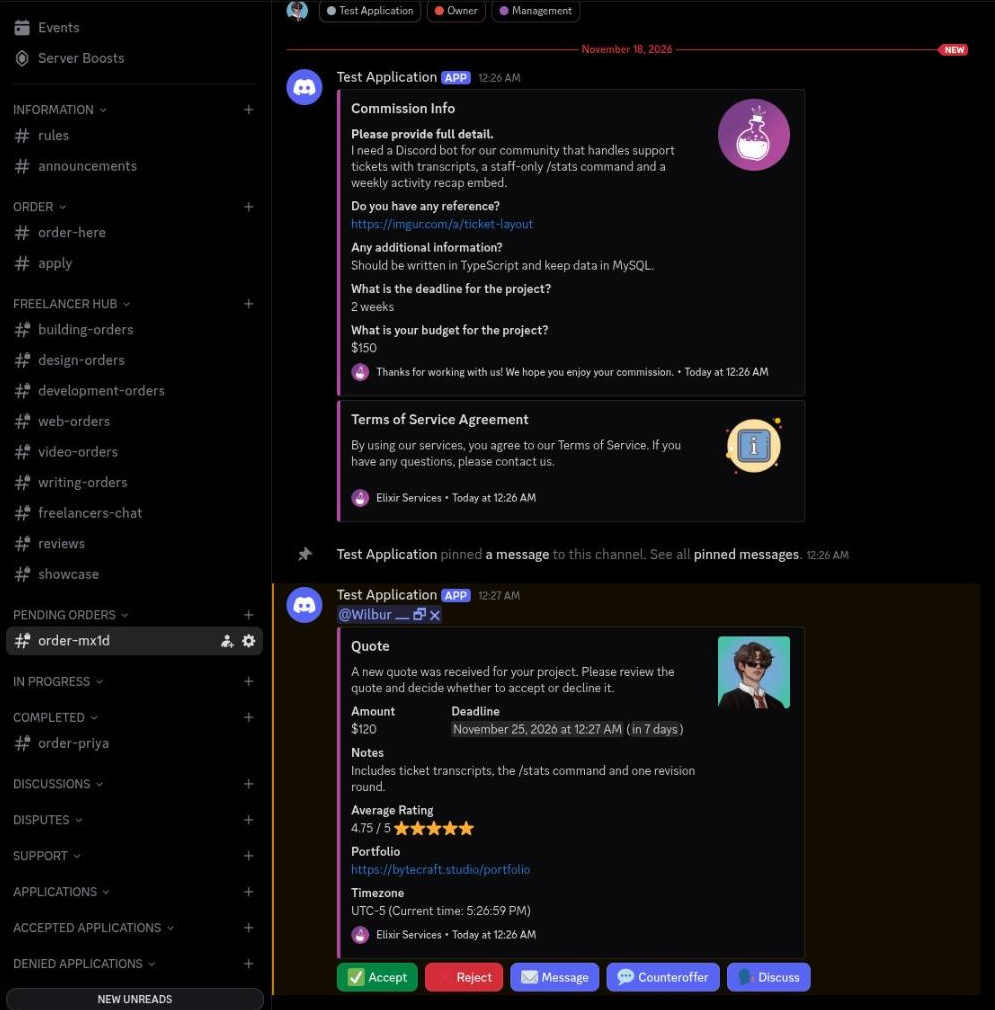
Commission Desk
Commission Ticket - Private channel named order-mira, created for the client when the order form is submitted. - Commission Info embed lists the answers as fields, with the long detail answer promoted to the description. - Terms of Service Agreement embed is posted directly under it. - Quote embed shows amount, deadline, notes, average rating, portfolio and timezone. - Quote buttons: Accept, Reject, Message, Counteroffer and Discuss. Quote Accepted - Quote Accepted embed records freelancer, client, commission channel, amount and deadline. - Invoice Created embed lists invoice ID, freelancer, client, price, fees and payment status. - Fees are calculated as 8% of the amount plus a fixed $0.49. - Pay Now link button opens the PayPal invoice for the client. Order Form - Modal titled Order Form, opened once a department and a specialty have been chosen. - Five required inputs: full detail, reference link, additional information, deadline and budget. - Deadline and budget are single line fields; the other three accept paragraphs. - The answers become the fields of the Commission Info embed in the new ticket channel. Freelancer Panel - Department channel where every new order is mirrored for the freelancers of that department. - Same Commission Info embed, with Quote, Notifications, Message, Discuss and Client Reviews buttons. - Quote opens the amount, deadline and notes modal; the bot confirms with a private Quote sent message. - Notifications subscribes the freelancer to the order so they hear when another freelancer claims it. Freelancer Profile - Profile embed for a freelancer: user, description, timezone with the current local time, availability, portfolio, amount made and average rating. - The rating line carries the score, the stars and the number of reviews. - Edit Profile button is only shown to the profile owner. Withdrawal Requests - Staff only channel where a payout request is raised once a commission has been reviewed. - The request embed shows amount, commission channel, requester and the PayPal address on their profile. - The amount is the paid amount minus the 15% server cut. - Approve, Deny and Get PayPal buttons; approving edits the message to Withdrawal Approved and clears the buttons. Order Panel - The order-here channel with the pinned order panel posted by the bot. - The panel carries a single Order button, with the footer stating that creating a ticket accepts the Terms of Service. - Pressing Order replies privately with the Terms of Service embed and an Accept button. - Accepting opens the department picker: six departments in one select menu, each with its own emoji and role.
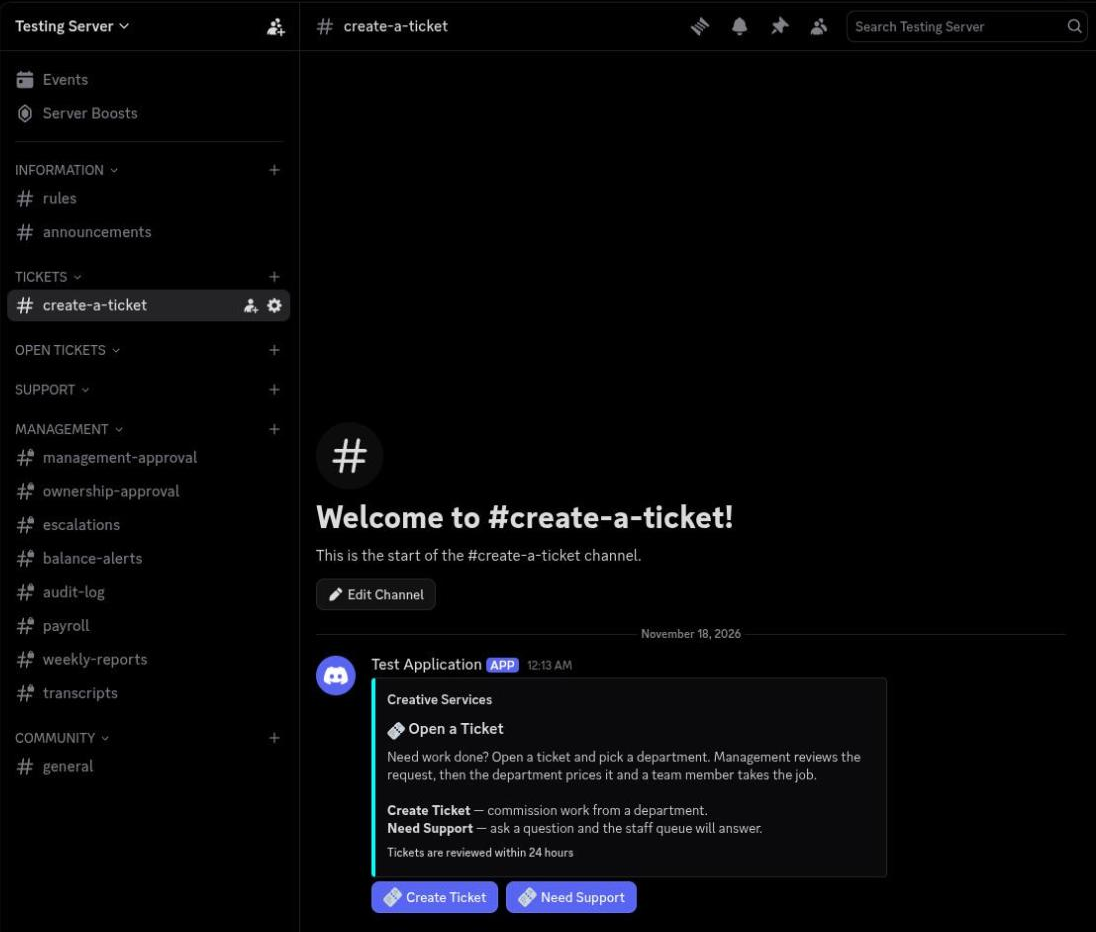
Staff Payroll
Ticket Panel - The create-a-ticket channel with the pinned panel posted by the bot. - The panel text is stored per server and rendered from the saved embed, so each department server can word it differently. - Two buttons: Create Ticket and Need Support, both opening a ticket flow. - Support tickets take a single question and land in the support queue instead of a department. Ticket Request - The ticket flow runs as one embed that updates in place while the requester answers, inside a five minute timeout. - The header keeps department, sub department, priority and deadline visible while the questions are answered. - Answered questions stay listed above the question currently being asked. - Back, Restart and Skip navigate the flow; the last step is a confirmation screen with Confirm Ticket, Go Back and Restart Ticket. Management Approval - Every submitted ticket is posted to the management channel with the department, ticket channel and priority. - Each question and answer is repeated as a field so management can price the work without opening the ticket. - Approve and Deny buttons; approval passes the ticket on to ownership, denial closes it with a reason. - Department review follows the same pattern once management has signed off, with Approve, Questions and Deny. Payroll Approval - Payroll is submitted per pay period and posted to the payroll channel for management. - The summary shows pay period, status and payday, then gross earnings, total deductions and net pay. - The deduction breakdown lists retainage at 20%, missed weekly reports at 5% each and late penalties. - Each project is itemised with its base amount, retainage, report and late deductions, and the net for that project. - Approve and Deny buttons; approving notifies the worker with their net pay and project count. Department Statistics - Per department totals: open tickets, completed tickets and total tickets. - Average completion time in days and total costs billed for that department. - The same command family covers global stats and a per worker quarterly view with earnings, retainage and strikes. Weekly Report - Posted to the weekly reports channel each time a worker submits, with the week range and submission time. - Counts the projects worked on and summarises how many sat in each stage. - Each project gets its own field with the stage emoji and the worker's notes. - Reports are due Sunday 23:59; a missed report adds 5% retainage to that worker's pay for the quarter.
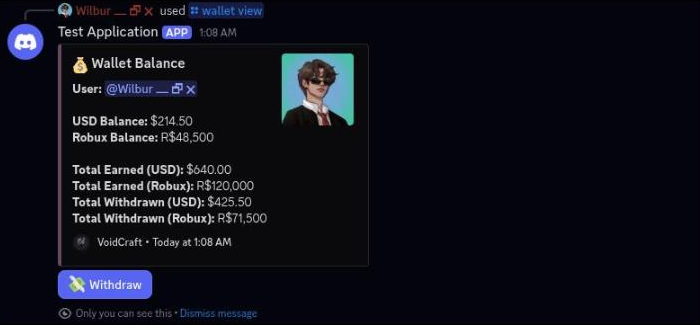
Server Wallet
Wallet Balance - Private wallet view for a freelancer: USD balance, Robux balance, total earned and total withdrawn for both currencies. - Robux is shown as R$ with thousands grouping, USD as $ with two decimals. - A Withdraw button is only attached while the wallet holds a balance. - The wallet keeps running totals only; there is no transaction history list. Withdraw Funds - Balance picker that opens when Withdraw is pressed, showing both balances before choosing a currency. - Withdraw USD and Withdraw Robux buttons lead to separate modals. - The USD modal is titled Withdraw USD and caps the amount to the current USD balance in the field label. - The Robux modal asks for the amount and the Roblox username. Withdrawal Requests - Staff channel where every wallet withdrawal lands for approval. - The request embed shows amount, currency type, requester, the payout address on their profile and the balance left after the request. - Approve, Deny and Get PayPal buttons; approving edits the message to Withdrawal Approved and removes the buttons. - Robux withdrawals post a separate embed with the Roblox username and remaining Robux balance, ping the management role and only offer Approve and Deny. Payment Methods - Posted in the commission ticket once a quote is accepted: amount due, freelancer and deadline. - Three payment buttons: PayPal, Robux and Pay with Balance. - Choosing Pay with Balance opens a private follow up showing the amount due next to both wallet balances. - The balance sub-picker only offers a currency the wallet can cover. Robux Payment - Robux payments are handled by hand, so the request goes to the management channel with the client, commission, USD amount and the estimated Robux total. - The estimate converts the amount due at the configured Robux exchange rate. - Management confirms with Confirm Payment or drops it with Cancel. - Confirming records the Robux actually received and posts a paid notice into the commission channel. Dispute Panel - A dispute opens its own channel named after the client, with the reason, both parties, the commission, the total paid and the deadline. - The first message carries Post Reply, Handle Dispute, View Channel and Close Dispute; Post Reply stays disabled until staff take the case. - Handling the dispute posts who is mediating it. - Each reply gets Agree, Disagree and Request Evidence buttons so both sides can mark up the other's statement. Affiliate Program - Private affiliate summary for a freelancer: referral invite link, number of invited clients, cut percentage and earnings so far. - Cut defaults to 2% and is paid on top of the freelancer's own earnings when a referred client completes a commission. - Earnings are credited to the wallet and announced in a direct message.
LATEST REVIEWS
@c.d.o.t
Arcane Studios
"Really great to work with, helpful and couldn't fault the guy. Top tier!"
@conquest_
Premier Studios
No comment was left.
@hostingsolutions
Rollerite
"always a 10/10 experience. Great to work with, great developer."